Bringing Biomechanics to the Web: Converting OpenSim Musculoskeletal Models into Browser-Ready 3D Animations
Discover how to bridge the gap between high-fidelity biomechanical data and web performance. This guide walks through converting heavy OpenSim musculoskeletal models into lightweight, interactive glb animations viewable in any standard browser via Three.js
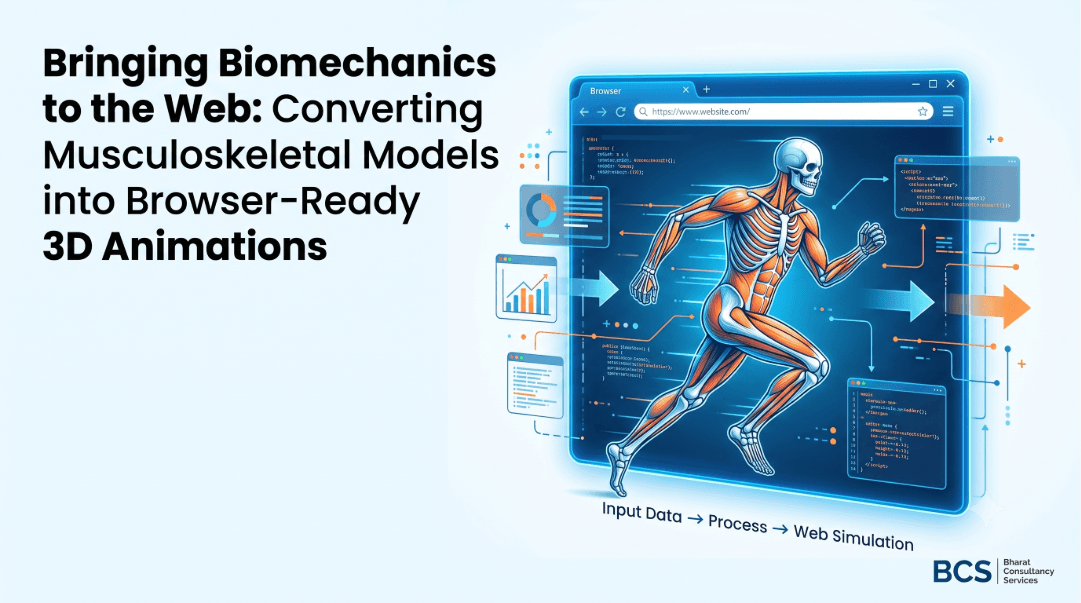
Web-based 3D applications are revolutionizing how we interact with data, yet bringing precise biomechanical simulations into a standard browser remains a complex challenge. By leveraging lightweight Python pipelines and standard WebGL rendering, developers can now translate dense musculoskeletal models directly into high-performance, shareable web assets.
The Biomechanical Web Revolution
For decades, specialized tools like OpenSim have been the gold standard for musculoskeletal modeling, enabling researchers to analyze human motion, calculate joint forces, and simulate complex surgeries. However, sharing these intricate visual models traditionally required bulky local software or rendering intensive video files. Today, moving these models seamlessly into browser environments unlocks massive potential for sports science, digital health, and remote client assessment.
The open-source pipeline showcased in the browser-opensim repository simplifies this paradigm. By targeting the highly optimized .glb binary format, users can transform standard data pipelines directly into interactively viewable web files accessible from any mobile or desktop device without plugins.
Anatomy of the Movement Pipeline
Translating a physical human movement into a precise browser animation involves key milestones across hardware and software boundaries. Below is the architecture required to scale data from raw video footage to interactive WebGL structures.
.trc space coordinates..osim model skeleton to output exact joint angles (.mot)..glb file.While steps 1 through 4 handle data generation and mechanical parsing externally, step 5 forms the critical core of this browser-oriented pipeline, compiling distinct physical parameters into low-overhead WebGL meshes.
The Technical Mapping Protocol
To execute step 5 effectively, the conversion layer matches column headings in the OpenSim motion file (.mot) to coordinate parameters within the structural model file (.osim). The architecture simplifies this matching protocol via a standard parsing pattern:
# Example of string formatting used to cross-reference joints
def normalize_name(name):
    # Strips path prefixes and common coordinate value suffixes
    return name.replace('/jointset/', '').replace('_value', '').lower()
During compilation, positional values are carefully translated to match standard browser scene metrics:
- Rotational Degrees: Automatically converted from degrees to radians for target WebGL scene trees.
- Translational Coordinates: Conserved natively in standard SI meters.
- Coordinate Alignment: OpenSim's standard system (Y-up, X-forward, Z-right) rotates automatically into standard glTF orientations via a specific +90° Y-axis structural transformation node.
Tooling and Converters Matrix
Different structural files utilize variant file schemas, mathematical formulas, or mechanical constraints. Choosing the correct converter from the repository depends directly on your model's underlying geometry setup:
| Conversion Script | Ideal Architecture Context | Notable Dependencies |
|---|---|---|
gem4_motion.py |
CustomJoint models utilizing coupled motion paths or complex splines. | NumPy, PyGLTFLib |
osim_mot_to_gltf.py |
Robust environments requiring deeply integrated XML namespace checking. | NumPy, PyGLTFLib |
gem3-3drender.py |
Binary VTP mesh parsing configurations requiring diagnostic debugging blocks. | VTK Toolkit |
osim_2.py |
Models using Multiplier, Linear, or SimmSpline functions. | NumPy, PyGLTFLib |
Regardless of your selected backend script, runtime initialization follows a unified command line interface pattern:
pip install numpy pygltflib
python gem4_motion.py Rajagopal2015.osim sub_walk.mot Geometry/ output.glb
Deploying the Interactive Web Viewer
Once the .glb asset compiles, displaying it on the frontend does not require sophisticated backend infrastructure. The framework relies on lightweight, CDN-delivered Three.js instances to populate the simulation frame.
<script src="https://cdnjs.cloudflare.com/ajax/libs/three.js/r128/three.min.js"></script>
<script>
// Native GLTFLoader instantiation inside the page context
const loader = new THREE.GLTFLoader();
loader.load('output.glb', (gltf) => { scene.add(gltf.scene); });
</script>
Note on Web Optimization: Serving the output file over compressed network transfers (like Gzip or Brotli) significantly reduces load latencies, allowing complex clinical models to load reliably even on slower mobile devices.
Advanced Alternative: IK Retargeting via FABRIK Solver
For applications requiring adaptive tracking adjustments inside the client interface, specialized viewers can leverage runtime coordinate configurations using custom solvers like FABRIK (Forward And Backward Reaching Inverse Kinematics). This allows rapid alignment checks against live motion trajectories directly inside the DOM layer.
Accelerate Your Engineering Pipelines
Transforming raw structural parameters into interactive, high-performance browser modules opens new horizons for clinical research, athletic optimization, and full-stack biomechanical applications. If you are looking to scale sophisticated web architectures or build custom AI-driven animation interfaces for your engineering or research platform, our development teams are here to accelerate your vision.
Explore how our enterprise consulting groups can power up your specialized workflow implementations, or read more high-performance development tutorials on our technical blog index.